1. Saving Excel xlsx Files
Use File → Save As and choose Excel (*.xlsx, *.xml) from the File of type list.
Note:
As of version 20.0, table references defined inside worksheets are not yet supported. Formulas such as:
=Meals[[#This Row],[Budget]] - Meals[[#This Row],[Actual]]
are loaded and saved with their values, but they are not recalculated.
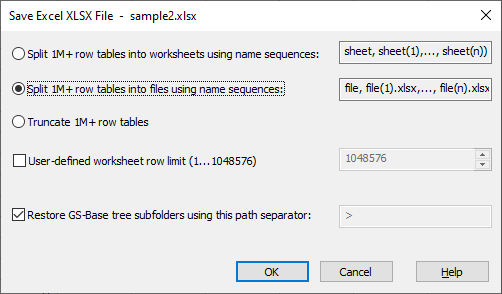
1.1 Save Options (Save Excel XLSX File Dialog)
-
Split rows into multiple sheets (1M rows per sheet)
(sheet, sheet(1), …, sheet(n))
If selected, sheets exceeding Excel’s row limits (1M for *.xlsx) are split into multiple worksheets. -
Split rows into multiple files (1M rows per file)
(file.xlsx, file(1).xlsx, …, file(n).xlsx)
Sheets exceeding Excel row limits are saved into multiple Excel files. Previously saved files with higher indices are deleted. All files share identical sheet structures. Sheets with fewer rows are saved as empty sheets in subsequent files.
When opening file.xlsx again in GS-Calc, all partial workbooks are automatically merged. -
Truncate rows above the Excel 1M-row limit
Saves all GS-Calc rows up to 32M, but Excel will only be able to read the first 1M. -
Save sheets with up to 32M rows in one sheet (exceeds the Excel 1M-row limit)
All rows above Excel’s limits are not saved. -
User‑defined worksheet limit
Allows specifying a custom threshold (1 to Excel’s 1M row limit) for splitting sheets when saving *.xlsx files using the first 2 of the above options. -
Enable restoring the GS-Calc folder structure […]
If selected, Excel sheet names are generated using full GS-Calc sheet tree paths, allowing GS-Calc to reconstruct the original folder structure when reopening the workbook back in GS-Calc.
Since “\” cannot be used in Excel sheet names, it is replaced with “>”.
2. Opening Excel xlsx Files
Use File → Open and choose Excel (*.xlsx) from the File of type list.
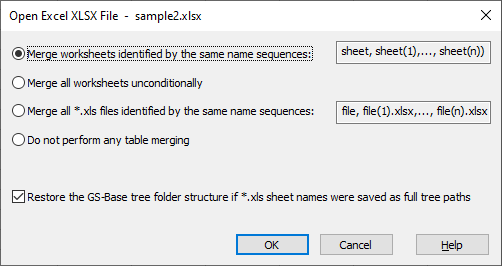
2.1 Open Options (Open Excel XLSX File Dialog)
The options available in this dialog box enable you to merge Excel sheets and workbooks split previously by GS-Calc. You can also load a given file as is, which also includes XLSX files with up to 32M rows.
3. Related Topics
GS-Calc *.gsc and ODF *.ods files
PDF files
Text files (*.csv, *.txt, *.tab ...)
Text *.zip archives
GS-Base (*.gsb) files
dBase/Clipper/FoxPro files
SQLite (*.db) files
MySQL (*.sql) files